Before we delve into the exciting new features and capabilities of ChargePro 2.0, let's start with an overview of what this app is all about.
ChargePro App is a user-friendly and intuitive solution for managing and optimizing battery performance on your devices. Whether you're a tech enthusiast, a busy professional, or a casual user, this app caters to all.
1.User-Friendly Interface
ChargePro App is designed with simplicity in mind. Its user interface is easy to navigate, ensuring that users of all levels of tech-savviness can make the most of its features. You don't need to be a battery expert to understand and benefit from this app.
2.Comprehensive Battery Stats
The app provides a comprehensive overview of your device's battery status. You can quickly check the remaining charge, battery health, and estimated usage time. It's like having a personal battery assistant at your fingertips.
3.Charging Control
One of the standout features of ChargePro is its charging control capabilities. It allows you to set charging limits and schedules, helping to extend the lifespan of your battery. No more overcharging worries.
4.Optimized Charging
With ChargePro, you can optimize your charging cycles, ensuring that your battery remains in peak condition. The app takes care of the technicalities so that you can focus on using your device.
5.Battery Tips and Alerts
ChargePro doesn't just provide data; it also offers valuable tips on battery care and maintenance. It can even send you alerts when it's time to unplug or charge your device.
6.ChargePro 2.0 - What's New?
The all-new ChargePro 2.0 App builds on the foundation of its predecessor and introduces several exciting enhancements. Here's a sneak peek at what's new:
- Enhanced Charging Control: The new version offers even more control over your charging process. You can set custom charging profiles tailored to your specific needs.
- Intuitive Dashboard: The redesigned dashboard provides at-a-glance information about your battery status. It's more visually appealing and user-friendly than ever.
- Improved Battery Tips: ChargePro 2.0 comes with a richer library of battery tips, helping you maximize your device's battery life.
- Smoother Performance: The app's performance has been optimized to run seamlessly on a wide range of devices.
As we explore the functionalities and benefits of Charge Controller App in the following sections, keep in mind that it seamlessly integrates with ChargePro, offering a complete solution for battery management.
Let's delve deeper into Charge Controller App's features and its role in optimizing your battery usage.
As we explore the world of efficient battery management, we come across the Charge Controller App – a companion app that takes the battery optimization game to the next level. Let's dive into the key features of this app and understand how it complements ChargePro for a comprehensive battery management experience.
Key Highlights:
1. Advanced Charging Algorithms
Charge Controller App harnesses advanced charging algorithms to ensure that your device's battery gets the treatment it deserves. These algorithms help in managing the charging process intelligently, maximizing the battery's lifespan.
2. Custom Charging Profiles
One of the standout features of Charge Controller is its ability to create and apply custom charging profiles. You can tailor the charging settings to suit your specific needs, whether you require a quick charge or a gentle trickle charge.
3. Scheduled Charging
Are you concerned about leaving your device plugged in overnight? With scheduled charging, you can set specific times for charging to avoid overcharging and keep your battery in optimal condition.
4. Battery Health Insights
Charge Controller provides valuable insights into your battery's health. It monitors the battery's overall condition, so you can take proactive measures to ensure it stays in top shape.
5. Seamless Integration
The real power of Charge Controller comes to life when it's integrated with the ChargePro App. Together, they form a comprehensive battery management solution. ChargePro provides the user-friendly interface and essential data, while Charge Controller fine-tunes the charging process for long-term benefits.
6. Real-time Monitoring
You can monitor your device's battery status in real-time with Charge Controller. This allows you to make informed decisions about your charging habits, whether it's to prolong battery life or ensure your device is always ready to go.
7. Battery Optimization
Charge Controller's primary goal is to optimize your battery's performance. By reducing stress on the battery during charging, it helps to prevent overheating and overuse, extending the battery's life.
8. Compatibility
Charge Controller is compatible with a wide range of devices and operating systems. Whether you're an Android or iOS user, you can harness its power for your battery management needs.
Remember, the true strength of Charge Controller lies in its synergy with the ChargePro App. By working together, these apps provide a complete solution for battery management that's both user-friendly and effective.
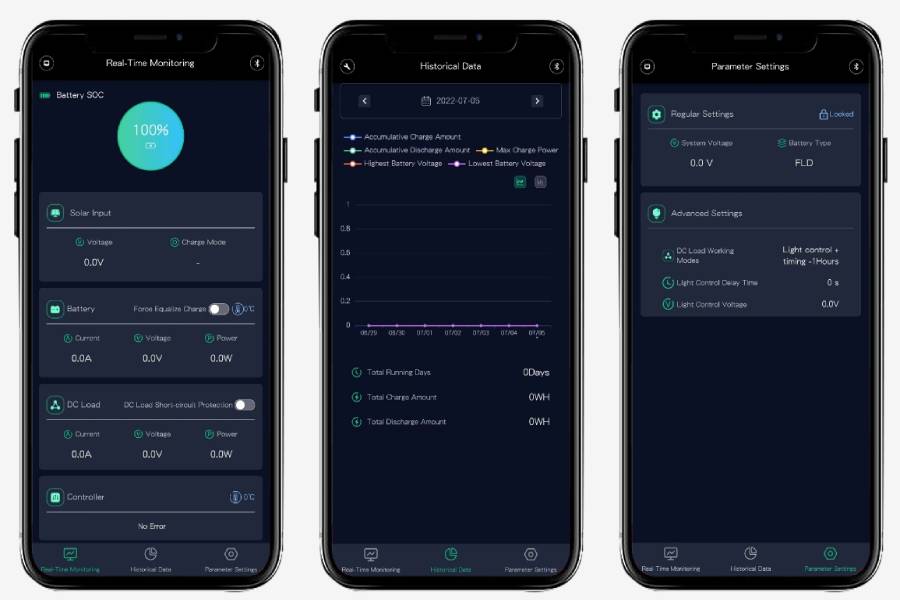
We offer both IOS and Android versions of this app, providing you with the convenience of monitoring crucial system performance data right on your mobile device. This includes information such as "PV Voltage," "Battery Voltage," "Charge Current," "Charge Parameters," "Controller Temperature," and more.
Why It's the Best App for Solar Charge Controllers:
Once you've downloaded the app, you can easily navigate its functions on your mobile phone. To begin, click the "+" in the upper-right corner to select the Bluetooth device ID. This step pairs the app with your charge controller.
For professionals seeking to fine-tune charge parameters or adjust controller settings through the app, you'll find these options on the last page. We strongly recommend downloading the app instruction guide from our download center before making any adjustments.
For those who aren't experts in this field, we advise against altering any parameters without guidance from your controller provider. Your system's settings are finely tuned, and it's crucial to maintain their integrity.
We provide language options to suit your preferences, including English, Spanish, and Chinese. Additionally, we're actively working on expanding our language support in the future to cater to a broader audience.


 Español
 Français
 Portugues
 العربية
 Deutsch
 日本語
日本語



 TEL
TEL E-Mail
 Address